Messages, System Prompts and Reasoning Tokens
When you build anything on top of a large language model — a chatbot, an agent, a code assistant — everything ultimately comes down to one primitive: a list of messages that you send to the model, and a message that the model sends back. This lesson walks through the building blocks of that conversation: user and assistant messages, system prompts, reasoning tokens, and tool calls.
User and Assistant Messages
At the API level, a conversation with an LLM is just an array of messages. Each message has a role and some content. The two roles you will use constantly are:
user— what the human (or your application, acting on the human's behalf) says to the model.assistant— what the model says back.
A minimal exchange looks like this:
[
  { "role": "user", "content": "What is the capital of France?" },
  { "role": "assistant", "content": "The capital of France is Paris." }
]
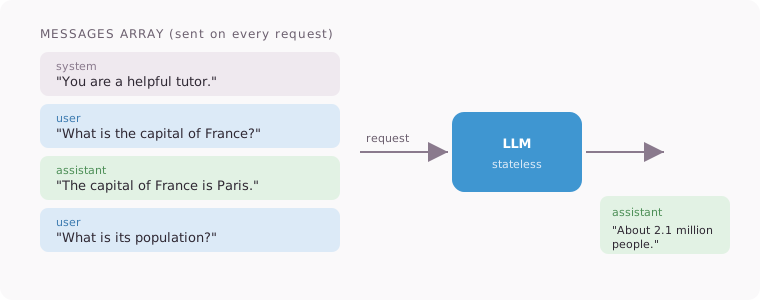
A crucial point that trips up many newcomers: the model has no memory between API calls. The API is stateless. If you want the model to "remember" the earlier parts of a conversation, you must send the entire message history back on every request. Chat applications feel continuous, but under the hood they are re-sending a growing list of messages each turn:
[
  { "role": "user", "content": "What is the capital of France?" },
  { "role": "assistant", "content": "The capital of France is Paris." },
  { "role": "user", "content": "What is its population?" }
]
Only because the previous turns are included can the model resolve "its" to "Paris".
Messages are not limited to plain text. Content can be multi-part: a single user message might contain a text block plus one or more images, PDFs, or other attachments, and a single assistant message might contain text plus other block types (we will see two of them — reasoning and tool calls — below).
System Prompts
A system prompt is a special instruction block that sits at the top of the conversation and defines how the model should behave. It is where you set the model's persona, rules, constraints, and context:
{
  "role": "system",
  "content": "You are a helpful customer support agent for Acme Corp. Only answer questions about Acme products. Always reply in a friendly, concise tone."
}
(Depending on the provider, this may be a message with role system or a dedicated top-level system parameter — the concept is identical.)
Two properties make system prompts important:
- Precedence. Models are trained to weight the system prompt more heavily than user messages. If a user message conflicts with the system prompt, the model should follow the system prompt. This is what lets you constrain a general-purpose model into a specific product experience.
- Invisibility to the end user. The person chatting with your app never sees the system prompt — it is injected by your application code.
That said, this precedence is trained behavior, not a hard guarantee. Users sometimes craft adversarial inputs designed to make the model ignore its system prompt — a practice known as jailbreaking (or prompt injection, when the malicious instructions arrive through data the model reads). The practical takeaway: treat the system prompt as strong steering, not as a security boundary. Anything truly sensitive must be enforced outside the model.
Reasoning Tokens
Modern models can "think before they speak." When reasoning (also called extended thinking) is enabled, the model first produces reasoning tokens — an internal chain of intermediate steps where it works through the problem — and only then produces the visible answer.
Conceptually, the assistant's reply becomes a multi-part message:
{
  "role": "assistant",
  "content": [
    { "type": "reasoning", "text": "The user is asking about X. First I should consider... Actually, a better approach is..." },
    { "type": "text", "text": "Here's the answer: ..." }
  ]
}
Key things to know about reasoning tokens:
- They dramatically improve performance on hard problems — math, debugging, multi-step planning — because the model can explore, backtrack, and self-correct before committing to an answer.
- You pay for them. Reasoning tokens are output tokens. More thinking means better answers but higher cost and latency, and most APIs let you set a budget to control the trade-off.
- They are usually not shown to end users (or shown collapsed/summarized). They are an internal scratchpad, not part of the polished response.
- They occupy context. Like every other token, reasoning consumes space in the context window, which matters in long conversations.
Tools
So far the conversation has been one-directional: the user asks, the model answers with text. Tools turn this into a two-way protocol between the model and your application.
You describe to the model a set of functions it may call — each with a name, a description, and a schema for its parameters. When the model decides a tool would help, instead of (or in addition to) replying with text, it emits a tool call:
{
  "role": "assistant",
  "content": [
    {
      "type": "tool_call",
      "name": "read_file",
      "arguments": { "path": "src/index.ts" }
    }
  ]
}
Critically, the model does not execute anything itself. It only produces a structured request. Your application executes the function and sends the result back as a new message — a tool result — and the loop continues:
{
  "role": "tool",
  "content": "export const app = createApp(); ..."
}
The model reads the result, may call more tools, and eventually produces a final text answer. This request → execute → result → continue loop is the engine behind agentic applications: an AI code editor reads files, runs terminal commands, and edits code through exactly this mechanism.
Video: A Deeper Look
For a broader tour of how these pieces fit into the bigger picture of large language models, this talk is an excellent companion to the whole course:
Putting It All Together
A realistic conversation payload combines everything from this lesson:
- A system prompt defines who the model is and what it may do.
- User messages (possibly multi-part, with images or files) carry the human's requests.
- The model emits reasoning tokens to think through the problem.
- It issues tool calls; your app executes them and returns tool results.
- It replies with an assistant message, which joins the history for the next turn.
Every LLM-powered product you have used — chat apps, coding agents, RAG search — is a variation on this loop. Master these primitives and the rest of LLM engineering becomes much easier to reason about.